
sgcWebSockets 2022.1부터 sgcWebSockets Pusher 클라이언트에서 사용자 정의 인증을 구현할 수 있어요.
Pusher는 연결이 인증 토큰을 제공하는 경우에만 비공개 또는 presence 채널 구독을 허용해요. 이를 통해 접근을 제한할 수 있어요.
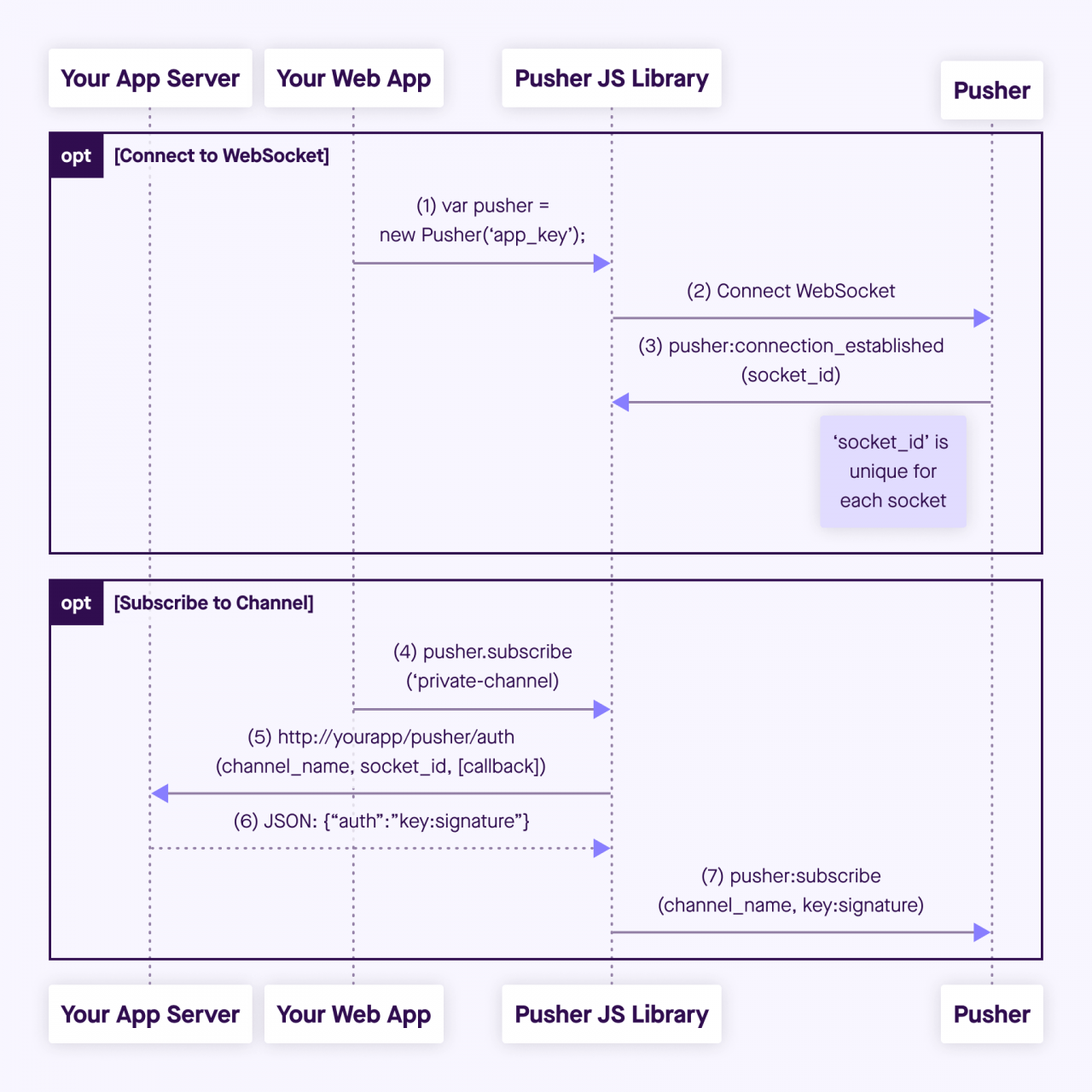
OnPusherAuthentication 이벤트를 사용해 자신만의 인증 흐름을 구축할 수 있어요. 이 이벤트는 구독 메시지가 Pusher에서 제공한 비밀 키로 서명되기 전에 호출돼요. 이 이벤트에는 SocketId, 채널 이름 등의 필드를 가진 인증 요청 파라미터 2개가 있으며, 자체 인증 서버에서 요청을 인증할지 여부를 결정하는 데 사용할 수 있어요. 아래에서 Pusher 인증 흐름을 보여주는 스크린샷을 확인하세요.
Pusher 비공개 구독 흐름
Delphi 예제
클라이언트가 Pusher 서버에 연결하면 Pusher에서 제공한 Key를 전송하고 서버가 식별 ID(socket_id)를 반환해요.
클라이언트가 비공개(또는 presence) 채널을 구독할 때 sgcWebSockets 클라이언트는 Pusher에서 제공한 Secret Key로 서명을 만들어 구독 메시지에 포함해요. OnPusherAuthentication 이벤트를 사용해 메시지 서명에 필요한 필드를 캡처하고 자체 인증 메서드를 구현할 수 있어요. 성공하면 서명을 반환하고 이 서명이 구독 메시지에 포함돼 서버로 전송돼요.
oClient := TsgcWebSocketClient.Create(nil);
oPusher := TsgcWSAPI_Pusher.Create(nil);
oPusher.Client := oClient;
oPusher.Cluster := 'eu';
Pusher.Name := 'js';
Pusher.Version := '4.1';
Pusher.TLS := True;
Pusher.Key := '9c3b7ef25qe97a00116c';
Pusher.Secret := ''; // the secret key is not known by the client, only by the authentication module
oPusher.OnPusherAuthentication := OnPusherAuthenticationEvent;
procedure OnPusherAuthenticationEvent(Sender: TObject; AuthRequest: TsgcWSPusherRequestAuthentication; AuthResponse: TsgcWSPusherResponseAuthentication);
begin
  // if the authentication request is succesful return the signature
  if CustomAuthentication(AuthRequest.Channel, AuthRequest.SocketID) then
    AuthResponse.Signature := GetCustomAuthenticationSignature;
end;
서명의 형식은 다음과 같아요:
비공개 채널: key:HMAC256(SocketID, ChannelName)
Presence 채널: key: HMAC256(SocketID, ChannelName, Data)