sgcWebSockets supports SignalR and SignalRCore protocols, teraz we will see an example of how connect to a SignalR Server using a c# sample from CodeProject webpage, you can access to article using the following link:
Artykuł pokazuje, jak utworzyć prosty serwer i klient przy użyciu SignalR jako protokołu — pełny kod C# jest hostowany na GitHubie
https://github.com/nthdeveloper/SignalRSamples
W poniższych liniach pokażę, jak połączyć się z tym serwerem SignalR, używając biblioteki sgcWebSockets.
Rozpocznij połączenie
In order to connect to a SignalR server, we will use TsgcWebSocketClient as websocket client and TsgcWSAPI_SignalR as SignalR API. Create first websocket client and SignalR API and attach SignalR API to WebSocket client.
WSClient := TsgcWebSocketClient.Create(nil);
SignalRAPI := TsgcWSAPI_SignalR.Create(nil);
SignalRAPI.Client := WSClient;
Then you must set server data connection. In this case, server is listening on url: http://localhost:8080. TsgcWebSocketClient has a property called URL where we can set URL of websocket server, as we will use websocket protocol our url will be: ws://localhost:8080
WSClient.URL := 'ws://localhost:8080';
Finally, SignalR requires a Hub name, in this demo, hub name is simplehub.
  SignalRAPI.SignalR.Hubs.Clear;
  SignalRAPI.SignalR.Hubs.Add('simplehub');
Następnie możemy wywołać WSClient.Active := True, aby rozpocząć nowe połączenie. Jeśli serwer jest aktywny, otrzymamy wiadomość od serwera informującą o pomyślnym połączeniu.
Wyślij wiadomość
Once connected, we can send a message to server, we will use WriteData method from TsgcWSAPI_SignalR component. SignalR uses a propietary protocol, basically is a JSON message with some arguments. In this example, method is called Send and argument is text message. Messages are received OnSignalRMessage event.
SignalRAPI.WriteData(Format('{"H":"simplehub","M":"Send","A":["%s"],"I":1}', [txtMessage.Text]));
procedure OnSignalRSignalRMessage(Sender: TObject; MessageId, aData: string);
begin
  DoLog('[' + MessageId + '] ' + aData);
end;
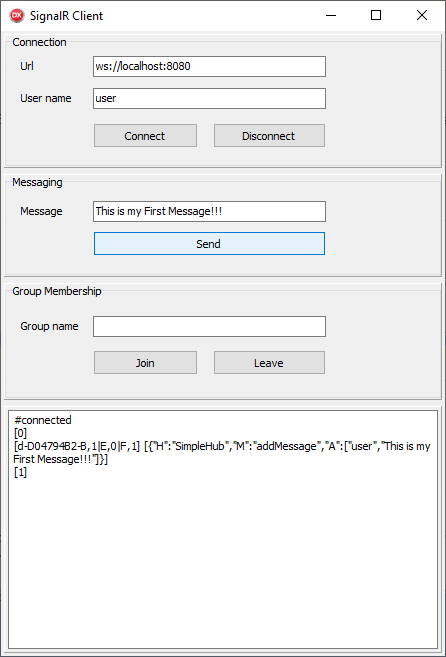
Wiadomości dołączania/wychodzenia
Server sample has 2 methods to join and leave users from a group. Message format is very similar to Send message, let's see some examples:
// join myGroup
SignalRAPI.WriteData(Format('{"H":"simplehub","M":"JoinGroup","A":["%s"],"I":2}', ['myGroup']));
// leave myGroup
SignalRAPI.WriteData(Format('{"H":"simplehub","M":"LeaveGroup","A":["%s"],"I":3}', ['myGroup']));
Pobieranie
Możesz pobrać skompilowany projekt dla C# i Delphi pod następującym linkiem: