
Trade Bar
You can use the TradeBar for Binance to place orders in an easy way. Configure the Order Buttons with the most used Orders and take advantage of our stable and fast components to connect to Binance Servers.
You can Trade the following markets:
- Spot
- Spot in Demo Account (TestNet)
- Futures
- Futures in Demo Account (TestNet)
Login
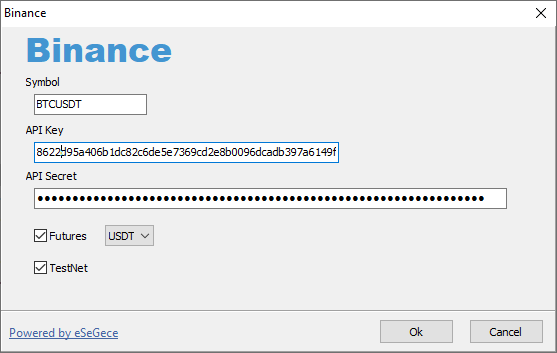
First introduce your API credentials, the Symbol you watch and which market (Spot or Futures) you want to trade.
Button Orders
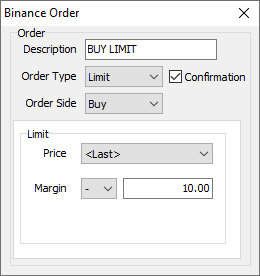
If you login successfully, the trade bar will be shown and you can start to configure the orders for every button. Select the option Edit Order and introduce the Order data:
- Description: Button text
- Order Type: Market, Limit, Stop or StopLimit
- Order Side: Buy or Sell
- Confirmation: if enabled, a form with the Order Data will be shown before the order is sent to market.
- LimitPrice: select if takes the Last price or it's a fixed value
- MarginPrice: you can sum or subtract a fixed value to the Price.
- StopPrice: select if takes the Last price or it's a fixed value.
You can Configure All the Order Buttons of the Trade Bar. You can Disable or Make Invisible using the popup menu of the order buttons.
